In modern healthcare, managing people is almost as important as managing clinical resources. Hospitals, clinics, healthcare trusts, and other care organisations depend on accurate rosters, timely communication, leave management, shift allocation, and reliable access to workplace information. When these activities are scattered across paper forms, emails, noticeboards, phone calls, and disconnected systems, even a well-organised workforce can spend considerable time dealing with administrative tasks.
This is where allocate loop enters the picture.
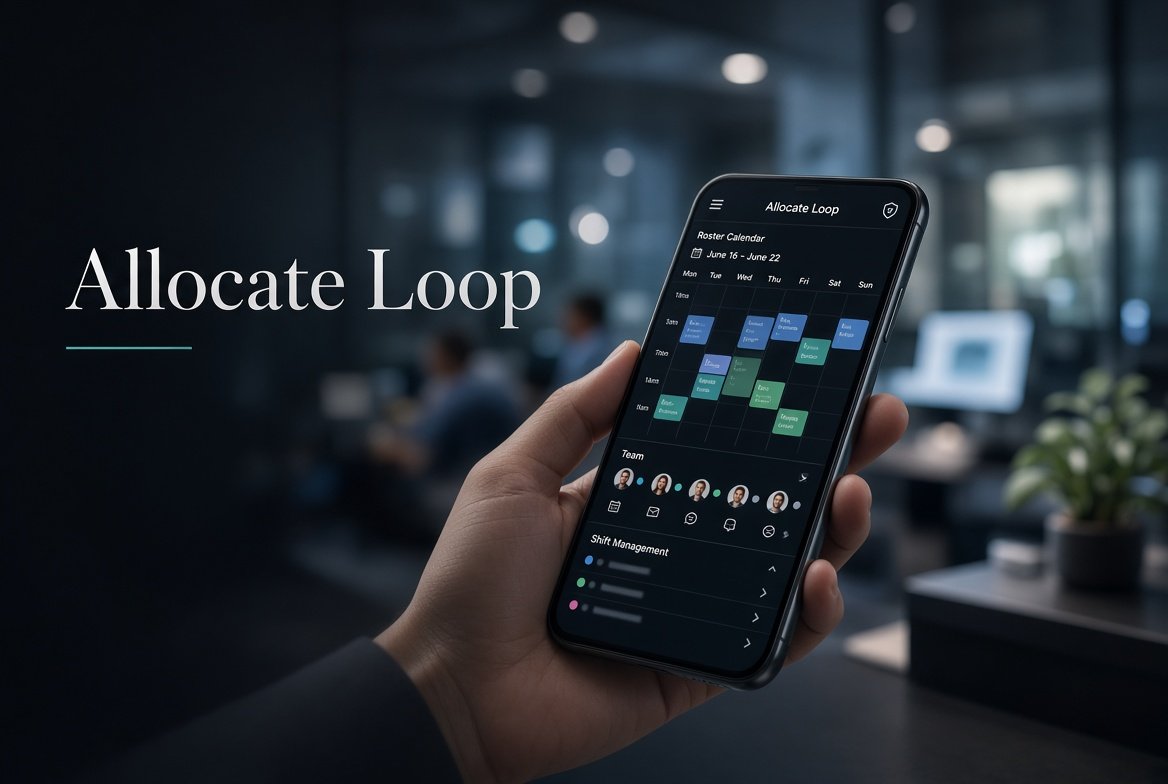
The term allocate loop is commonly associated with Allocate Loop, a workforce application designed for healthcare organisations. The platform brings several aspects of workplace administration into a connected digital environment, allowing eligible staff to view rosters, communicate with colleagues, manage certain leave and duty requests, and access organisational information from a mobile device or other supported interface. Allocate’s own product information describes the platform as working alongside its rostering technology to give employees greater control over routine work-life administration.
For people searching for allocate loop, however, the name can initially be confusing. Some users may encounter the words in conversations at work, while others may see the application listed in an app store and wonder what it actually does. The platform is not simply a messaging application and it is not merely a digital calendar. Its purpose is broader: it connects workforce communication with practical administrative functions associated with healthcare employment.
This detailed guide explains what allocate loop means, what the platform does, who can use it, how its major features work, why organisations use it, what users should know about access, and how it fits into the wider healthcare workforce-management environment.
What Is Allocate Loop?
Allocate Loop is a digital workforce application developed for healthcare organisations. Its functions are designed around the everyday needs of healthcare employees who need to know when and where they are working, communicate with colleagues, request certain duties or leave, and receive information from their organisation.
The official product description states that Loop can provide access to personal and team rosters, leave requests, bank-shift requests, call-outs, clocking functions, and other workforce-related activities, depending on how an organisation has configured the system. It also provides communication features such as personalised newsfeeds, messaging, comments, surveys, and polls.
The exact experience can therefore differ from one organisation to another.
This point is particularly important when researching allocate loop. A healthcare employee may read about a feature online and discover that the feature is unavailable in their own organisation. That does not necessarily mean the application is malfunctioning. Some functionality is controlled by the employer’s implementation, configuration, workforce-management setup, or local policies.
The Google Play listing similarly explains that organisations must be signed up to Loop before employees can use it. The listing describes functions including viewing personal and team rosters, booking certain vacant or bank shifts, requesting leave, communicating with colleagues, and accessing organisational news.
In simple terms, allocate loop can be understood as a workplace hub for healthcare staff.
Why the Name Allocate Loop Matters
People sometimes search for a product using different word combinations. The phrase allocate loop can refer to the application itself, while searches involving “Loop” and “Allocate” may reflect the same product or a user’s attempt to identify the application used by their employer.
Allocate is associated with healthcare workforce-management software, while Loop is the employee-facing environment designed to bring communication and work-life administration together.
The distinction matters because a person who searches for allocate loop may actually be trying to answer a practical question:
- Where can I see my roster?
- How can I request leave?
- Where can I find available shifts?
- How do I communicate with colleagues?
- Why cannot I log in?
- Does my hospital use Loop?
- Can I access my work schedule from my phone?
- Why does my roster look different from someone else’s?
The answers depend partly on the organisation using the system.
Allocate Loop Biography Table
For readers researching the platform, a quick reference table is useful. The biography table is very important because it summarises the identity and purpose of the application before the more detailed discussion begins.
| Attribute | Details |
|---|---|
| Product name | Allocate Loop |
| Developer | Allocate Software |
| Current corporate association | RLDatix |
| Primary sector | Healthcare |
| Main purpose | Workforce communication and work-life administration |
| Major function | Personal and team roster access |
| Communication | Newsfeeds, messaging, comments and organisational updates |
| Workforce functions | Leave, duties, vacant shifts and other configured activities |
| Platforms | Mobile applications and supported web access |
| Availability | Dependent on organisational adoption |
| Intended users | Employees of participating healthcare organisations |
| Access | Typically controlled through the organisation |
| Mobile availability | Android and Apple devices |
| Geographic presence | Used by healthcare organisations in multiple markets |
The current Google Play listing identifies Allocate Software as the developer and describes the application as a healthcare communication and work-life-management tool. The Apple App Store similarly identifies Allocate Software as the provider and describes the application as serving healthcare workers.
The Main Purpose of Allocate Loop
The central idea behind allocate loop is to reduce friction between healthcare employees and routine workforce administration.
Healthcare schedules can be complicated. Staff may work different shifts, rotate between departments, cover colleagues, request leave, participate in bank work, or work across multiple locations. A traditional system based heavily on paper documents and telephone calls can make relatively simple tasks unnecessarily time-consuming.
A connected digital system can put information closer to the employee.
For example, instead of calling a ward to confirm a shift, an eligible employee may be able to view their roster through Loop. Instead of relying solely on a physical noticeboard for organisational updates, the employee may see information through a newsfeed.
The official Allocate product page specifically presents Loop as a way to help employees manage work-life administration without relying on paper forms, noticeboards, or waiting on telephone calls.
That does not mean every administrative process becomes automatic. Rather, allocate loop creates a digital channel through which many routine interactions can be handled.
Viewing Personal Rosters
One of the most important functions associated with allocate loop is roster access.
A roster tells employees when and, depending on configuration, where they are expected to work. In healthcare, roster information can be particularly important because staffing often operates continuously across mornings, afternoons, nights, weekends, and holidays.
The application allows eligible users to view their own roster and, where enabled, information about their team’s working arrangements. The official description says employees can view personal and team rosters and see scheduled activities.
This can make roster information more accessible.
Instead of waiting to reach a desktop computer or asking another member of staff for information, a worker may be able to consult the application directly.
However, users should remember that the application displays information supplied through their organisation’s workforce system. If a roster has not been approved, has recently changed, or contains an administrative error, the app cannot independently determine what the correct schedule should be.
Team Roster Visibility
Another notable aspect of allocate loop is team visibility.
Healthcare work is highly collaborative. Nurses, doctors, allied health professionals, administrators, support workers, and other employees may need to understand who else is scheduled to work. Appropriate visibility can help teams coordinate daily operations.
Where an organisation enables the feature, Loop can show team roster information and help employees identify colleagues with whom they are working.
The official product information describes the ability to see who is working with you and to connect employees through roster-based staff groups.
This creates an important connection between scheduling and communication.
A roster is no longer only a list of names and times. It can become a starting point for workplace collaboration.
Communication Features
Allocate Loop is not limited to scheduling.
The platform includes communication functionality designed for workplace communities. Users can receive organisational news, communicate with connections, participate in staff groups, comment on posts, and interact with information shared through the newsfeed.
The app-store listing states that employees can connect with colleagues without needing to exchange personal contact details. It also describes instant messaging, staff groups, newsfeed updates, comments, likes, and profile personalisation.
This approach can be valuable in environments where employees may work irregular schedules or across multiple locations.
Instead of relying entirely on personal messaging applications, an organisation can provide a dedicated workplace environment.
Organisational Newsfeeds
A workplace newsfeed can serve as a central communication channel.
Healthcare organisations frequently need to communicate updates about policies, events, operational changes, staff announcements, training, and other matters. Email is useful, but employees may not always have constant access to their work inboxes.
Allocate’s own product page describes personalised newsfeeds as part of Loop’s communication environment.
For employees, this can make organisational communication more visible.
For employers, it provides another route for distributing information to a workforce that may be spread across wards, departments, buildings, or locations.
Messaging Without Sharing Personal Numbers
One feature that distinguishes allocate loop from ordinary consumer messaging applications is its workplace orientation.
Employees can connect with colleagues through the organisational platform rather than necessarily sharing personal telephone numbers. The official product description specifically highlights communication without requiring personal contact details to be exchanged.
This can help maintain a boundary between professional and personal communication.
That boundary is especially relevant in healthcare, where large teams may include permanent staff, temporary workers, rotating trainees, bank staff, and employees working different patterns.
Staff Groups and Roster-Based Connections
Loop can also connect employees based on workforce information.
The official app listing explains that users can be automatically added to staff groups when their roster is posted, allowing them to communicate with teammates.
This is particularly interesting because it links scheduling with community building.
A new employee, for example, may not personally know every person on a department’s roster. A roster-linked group can provide a structured way to discover colleagues and communicate with the people working alongside them.
Leave Requests
Leave management is another important component of allocate loop.
Employees may be able to submit annual or study leave requests through the application, depending on their organisation’s configuration.
The official app listing explicitly identifies annual and study leave booking as supported functionality, while the Allocate product page describes leave requests among Loop’s workforce-management capabilities.
Digital leave requests can reduce dependence on paper forms and make the request process easier to track.
Nevertheless, submitting a request does not automatically mean that the leave has been approved. Approval remains subject to the organisation’s policies, staffing requirements, and workforce-management processes.
Bank and Vacant Shifts
Healthcare organisations frequently need to fill vacant shifts.
Allocate Loop can support this process by allowing eligible employees to see and request certain available duties or bank shifts. The exact availability depends on how the organisation has configured the platform.
The Google Play description says users can book vacant and bank shifts and request duties in advance, with functionality varying by organisation.
The product information also explains that Loop can work alongside temporary staffing solutions to make certain vacant duties bookable through the platform.
This can create a more direct connection between available work and staff who are interested in taking it.
Requesting Duties
Another function associated with allocate loop is the ability to request duties.
Rather than waiting for an administrator to manually coordinate every request, eligible workers may be able to express interest in particular duties through the application.
The precise workflow depends on the employer’s setup.
This is an important principle when using any workplace application: the software provides the mechanism, while the organisation establishes the rules.
Call-Out and Clocking Functions
Allocate’s product information also lists call-outs and clocking in and out among Loop’s capabilities.
These functions can be particularly relevant in environments where attendance and staffing records need to interact with workforce-management systems.
A clocking function, for example, can potentially provide a digital record of work-related attendance. A call-out process can help an organisation record situations in which an employee cannot attend a scheduled duty.
Again, not every organisation necessarily enables every function.
Anonymous Reporting
Workplace communication sometimes involves sensitive concerns.
The application listing says users can send an anonymous report to their organisation when they are concerned about a teammate.
The Allocate product page also presents anonymous reporting as part of the platform’s workplace-safety approach.
This feature illustrates that allocate loop is designed to be more than a simple roster viewer. It is intended to provide a broader communication environment for employees.
The precise handling of reports, including who receives them and what procedures follow, is determined by the organisation.
Who Can Use Allocate Loop?
Allocate Loop is not an unrestricted social network.
The application is designed for employees of organisations that have implemented Loop.
The Google Play listing clearly tells prospective users that their organisation must be signed up to Loop before they can use it.
This explains why someone might download the app successfully but still be unable to access the system.
Simply installing the application does not create an independent workplace account.
An employee generally needs to belong to an organisation that uses the platform and must follow that organisation’s access or invitation process.
Is Allocate Loop Only for Healthcare Workers?
The platform is strongly associated with healthcare workforce management.
Both the official product page and current app-store descriptions position Loop around healthcare employees and organisations.
That healthcare focus is visible in the features themselves: rosters, shifts, bank duties, leave, workplace communication, and team visibility are all highly relevant to healthcare operations.
A user searching allocate loop should therefore not confuse it with a general-purpose workforce app intended equally for every industry.
Allocate Loop and Workforce Management
Workforce management involves much more than creating a schedule.
An effective system needs to account for employee availability, qualifications, working patterns, leave, staffing requirements, vacancies, communication, and operational changes.
Allocate Loop sits within this wider ecosystem.
The product is connected with Allocate’s broader workforce and rostering technology, including its Optima environment. The company’s product information explains that Loop integrates with its rostering solution so employees can manage aspects of their work-life administration.
This relationship is important because a mobile application is only as useful as the workforce information behind it.
If the underlying roster is accurate and current, the employee-facing experience becomes considerably more useful.
Allocate Loop on Mobile Devices
Mobile access is one of the application’s defining characteristics.
Healthcare employees do not necessarily spend their working day at a desk. A mobile application makes sense for staff who move between wards, clinical areas, offices, buildings, and other workplaces.
Current Apple and Google Play listings show Allocate Loop as a mobile application. The Apple listing supports iPhone and iPad and identifies iOS 13 or later as a requirement for the listed version.
The Google Play listing provides the Android version and describes current functionality for healthcare workers.
Allocate Loop on Desktop
Although the mobile experience is central, Loop is not necessarily limited to phones.
A healthcare policy document from an NHS trust identifies Allocate Loop as being available as a mobile app or through a desktop web browser.
Desktop access can be useful for employees who prefer a larger screen, particularly when reviewing schedules or handling administrative information.
The precise availability of web functionality depends on the organisation’s implementation.
Getting Started With Allocate Loop
The process for getting started generally begins with the employer rather than the app store.
A typical user journey may look like this:
Step 1: Confirm That Your Organisation Uses Loop
Ask your manager, roster team, HR department, IT department, or workforce-management team whether your organisation has implemented Loop.
Step 2: Install the Correct Application
Use the official application provided for your region or organisation.
Current listings include a general Allocate Loop application and a separate US version.
Step 3: Follow Your Organisation’s Access Process
Some organisations may provide instructions, invitations, credentials, or other onboarding information.
Step 4: Sign In
Use the method provided by your employer.
Step 5: Check Your Profile and Roster
After access is established, review your personal information and roster.
Step 6: Explore Available Functions
Depending on your organisation, you may see options for leave, duties, shifts, messaging, news, groups, or other workforce activities.
Why Some Features May Be Missing
A common source of confusion is the assumption that every user should see exactly the same menu.
That is not necessarily the case.
The app listing repeatedly notes that some workforce features vary by organisation.
One healthcare organisation might enable bank-shift booking, while another might use Loop primarily for communication and roster viewing.
One organisation might allow certain leave workflows, while another may retain a separate process.
Therefore, missing functionality should not automatically be interpreted as an application error.
Common Allocate Loop Login Problems
People searching allocate loop may often be trying to solve an access problem.
Several situations can prevent successful access.
Organisation Has Not Enabled Your Account
Your employer may use Loop but your individual account may not yet have been activated.
Incorrect Login Information
Entering outdated or incorrect credentials can prevent access.
Organisation Configuration
Your organisation may have a particular authentication process that differs from another employer.
Application Version
An outdated app can sometimes cause compatibility or performance problems.
The current app listings show that Loop continues to receive updates and bug fixes. The Google Play listing, for example, records recent updates during September 2026.
Network Problems
A weak or unstable internet connection can interfere with login or synchronisation.
Service or Organisation Issues
Sometimes the issue may originate with the employer’s configuration or the connected workforce system rather than the employee’s phone.
Why Your Roster May Look Different
A roster is dynamic.
It can change because of staffing adjustments, leave, sickness, operational requirements, shift swaps, approvals, or other workforce decisions.
If two employees see different information, the difference may reflect their individual roles, departments, permissions, or schedules.
It is therefore sensible to check the latest approved information and contact the appropriate roster or workforce team when something appears incorrect.
Allocate Loop and Privacy
Privacy is particularly significant in healthcare environments.
The platform’s app-store privacy information indicates that data practices can include personal information, messages, app activity, diagnostics, and other categories, with practices varying according to the version and use of the service. Google Play also states that data is encrypted in transit and that users can request deletion of data under the conditions described by the developer.
Apple’s listing similarly provides privacy information supplied by the developer and notes that some usage and diagnostic information may be collected in ways that are not linked to the user’s identity.
Users should read the privacy information applicable to their specific version and organisation.
More importantly, healthcare employees should remember that a workplace application is not the same as a personal social-media account. Professional communication should remain appropriate to organisational policies and confidentiality requirements.
Allocate Loop and Workplace Communication
One of the more interesting characteristics of allocate loop is its attempt to bring workforce administration and workplace communication into one environment.
Historically, these functions have often been separated.
A worker might receive a roster from one system, organisational announcements by email, leave information from another portal, and colleague communications through personal messaging.
Loop attempts to bring some of these activities together.
This can create a more coherent employee experience.
Allocate Loop for New Employees
New healthcare employees often face an information overload during their first weeks.
They need to understand schedules, colleagues, departments, policies, communication channels, and workplace expectations.
A central workforce platform can reduce some of that fragmentation.
Allocate’s product information describes features intended to connect new and existing employees with colleagues, including roster-linked groups and communication tools.
This can help employees become familiar with the people around them, particularly when teams are large or spread across multiple sites.
Allocate Loop Across Multiple Locations
Healthcare organisations can operate across hospitals, clinics, outpatient facilities, community services, and other locations.
A digital workforce platform can help employees access relevant information without depending on a single physical noticeboard.
Allocate’s product material describes users being able to see where colleagues are working across multiple locations in customer examples.
The usefulness of this capability depends on what information the organisation makes available.
The Role of Notifications
Notifications can make a workplace application more useful because employees do not have to manually check every section throughout the day.
Depending on configuration, users may receive alerts related to messages, organisational posts, roster activity, or other updates.
However, notifications can also become distracting when poorly configured.
A practical approach is to keep essential workplace notifications enabled while managing nonessential alerts according to personal preference and organisational requirements.
Allocate Loop and Employee Convenience
Convenience is one of the strongest reasons organisations adopt employee-facing digital platforms.
A staff member may need to check tomorrow’s shift while travelling home. Another employee may want to review a leave request outside ordinary office hours.
The ability to access information through a mobile device can make these activities less dependent on location.
Allocate describes Loop as enabling employees to manage work-life administration “anytime and anywhere,” reinforcing this mobile-first concept.
Allocate Loop and Administrative Efficiency
Digitalisation does not eliminate administration, but it can change where the administrative work happens.
Instead of an administrator entering every routine request manually, employees may submit certain requests themselves.
Instead of repeatedly answering questions about rosters, workforce teams can provide employees with direct access to their schedules.
Instead of distributing every announcement individually, organisations can publish updates through a central communication channel.
This can potentially reduce repetitive administrative activity.
What Makes the Platform Different From a Normal Messaging App?
At first glance, messaging and newsfeeds might make allocate loop look similar to a social network.
The difference is purpose.
Consumer social networks are primarily designed around personal relationships, entertainment, public content, or broad communities.
Loop is built around a defined workplace environment.
Its communication features are connected with employee identity, organisational membership, rosters, duties, leave, and workplace information.
That integration is what gives the platform its distinctive role.
What Makes Allocate Loop Different From a Calendar?
A calendar shows dates and events.
A workforce platform can connect dates with staffing information.
For healthcare workers, the difference is meaningful.
A roster can represent specific duties, shifts, teams, departments, and workforce arrangements rather than simply showing personal appointments.
Loop therefore functions as part of a wider workforce-management ecosystem rather than simply acting as a calendar application.
Allocate Loop Updates and Development
The platform continues to receive updates.
The current Google Play information records recent releases and improvements, while the Apple App Store version history includes enhancements involving messaging, media, targeted replies, leave, duty requests, and other functionality.
This indicates that the product is actively maintained rather than being a static legacy application.
The exact features available at any given time can change as new versions are released and organisations configure additional capabilities.
Allocate Loop for Organisations
From an organisational perspective, the value of Loop extends beyond individual convenience.
A healthcare organisation can use the platform as a channel for:
- Workforce communication
- Roster visibility
- Leave management
- Shift requests
- Bank-duty coordination
- Staff engagement
- Team communities
- Organisational news
- Surveys and polls
- Anonymous concerns
- Employee access to workforce information
Allocate’s own product page describes these capabilities as part of a broader effort to improve workforce communication and employee administration.
The Importance of Configuration
Software capabilities should never be confused with guaranteed availability.
This is one of the most important points in understanding allocate loop.
Two hospitals can use the same platform while offering different functionality to their employees.
The difference may come from:
- Organisation policies
- Workforce structure
- System integrations
- Permissions
- Local configuration
- Staff roles
- Regional requirements
- Administrative decisions
Therefore, the best source for a specific employee’s available features is usually their own organisation.
Is Allocate Loop Free?
The mobile application listings show the app itself as free to download.
However, that does not mean the underlying workplace service is a free consumer platform.
Allocate Loop is part of an organisational workforce-management environment. Employees generally access it because their organisation has implemented the service.
For an individual user, the important question is therefore not simply whether the app costs money to download, but whether their employer provides access.
Allocate Loop Reviews and User Experience
Current app-store information provides evidence that the application has an established user base.
The UK Apple App Store listing shows thousands of ratings and an overall rating of 4.5 at the time of the current listing, while Google Play shows more than 500,000 downloads for the general application.
Ratings should nevertheless be interpreted carefully.
An app-store rating represents the experiences of people who choose to review the application. It does not necessarily represent every organisation, employee, configuration, or workflow.
A person may have a positive experience because the roster and communication functions work smoothly, while another user may encounter difficulties caused by local implementation or connectivity.
Common Reasons Employees Value Allocate Loop
Users may find allocate loop useful because it puts several everyday workplace tasks in one location.
Potential advantages include:
- Easy access to rosters
- Mobile convenience
- Team visibility
- Direct workplace messaging
- Organisational announcements
- Digital leave requests
- Access to available duties
- Reduced dependence on paper processes
- Separation between work communication and personal contact information
The official product page and app listings support these broad capabilities.
Potential Challenges
No digital platform eliminates every workplace problem.
Potential challenges can include:
Learning Curve
New users may need time to understand the interface.
Connectivity
Mobile access depends on an adequate internet connection for many functions.
Configuration Differences
Employees may not have access to every feature.
Incorrect Workforce Data
If the underlying roster is incorrect, the employee-facing application may display incorrect information.
Notification Overload
Frequent workplace notifications can become distracting.
Access Problems
Employees may need assistance from their organisation when authentication or account setup fails.
These issues do not necessarily indicate that the platform itself is defective. Many are characteristics of deploying digital workforce software across a complex organisation.
How to Use Allocate Loop Effectively
A few habits can make the experience more reliable.
First, check the roster regularly rather than relying on memory.
Second, keep the application updated.
Third, review important workplace notifications.
Fourth, submit requests through the correct workflow rather than assuming that a message to a colleague constitutes an official request.
Fifth, contact the relevant roster or workforce team when information appears incorrect.
Finally, treat workplace communication professionally and follow the organisation’s confidentiality and communication policies.
Allocate Loop and Digital Transformation in Healthcare
The broader significance of allocate loop lies in healthcare’s continuing shift toward digital workforce management.
Healthcare organisations manage large numbers of employees with complicated schedules and changing operational requirements.
Digital tools can help connect employees with information that previously required manual intervention.
The transition is not simply about replacing paper with smartphones. It represents a change in how information moves through an organisation.
A roster becomes accessible in real time.
A leave request can enter a digital workflow.
A workplace announcement can reach employees through a central channel.
A vacant duty can become visible to eligible workers.
A colleague can be contacted without exchanging personal numbers.
These individual improvements can collectively change the employee experience.
Security and Responsible Use
Workplace applications should always be used responsibly.
Healthcare employees may encounter information involving colleagues, schedules, organisational activity, or other workplace matters.
Users should therefore avoid sharing confidential information through inappropriate channels and should follow their employer’s information-governance requirements.
The app’s store listings provide developer-reported information about data handling and encryption in transit.
That technical information is useful, but security also depends on user behaviour, organisational policies, account protection, device security, and the wider technology environment.
What to Do If Allocate Loop Shows the Wrong Shift
If your roster appears incorrect, do not automatically assume that the application is responsible.
Start by checking whether the roster has recently changed.
Then confirm whether the displayed information is approved.
If the problem remains, contact the appropriate roster, workforce, HR, or administrative team within your organisation.
The application is primarily a channel through which workforce information is displayed and managed. The organisation remains responsible for the underlying scheduling decisions.
What to Do If You Cannot Find Your Organisation
If you downloaded allocate loop but cannot access it, first confirm whether your employer actually uses the platform.
If the organisation does use Loop, ask the appropriate internal team for activation or login instructions.
Do not create unofficial accounts or attempt to use another organisation’s credentials.
Workplace systems are designed around controlled organisational access.
Allocate Loop for Employees Working Shifts
Shift workers are among the people who can benefit most from mobile roster access.
Healthcare employees may work nights, weekends, long shifts, rotating schedules, or changing assignments.
A smartphone-based roster can make it easier to check work arrangements without visiting a workplace computer.
This is especially useful when employees need information outside conventional administrative hours.
Allocate Loop and Team Culture
The platform also has a social dimension within the workplace.
Newsfeeds, groups, messaging, comments, and colleague connections can create a digital community around the workforce.
Allocate describes Loop as a place where employees can connect with colleagues and specialist interest communities.
This can be particularly useful in large organisations where staff may otherwise interact only with a small group of colleagues.
Frequently Asked Questions About Allocate Loop
What is allocate loop?
Allocate loop commonly refers to Allocate Loop, a healthcare workforce application used by participating organisations for roster access, workplace communication, leave requests, shift-related activities, and other work-life administration.
Is allocate loop a real application?
Yes. Allocate Loop is listed on major mobile application stores, including Google Play and Apple’s App Store. The current listings identify Allocate Software as the developer/provider.
Who can use allocate loop?
Employees generally need to work for an organisation that has adopted Loop. The Google Play listing specifically tells users that their organisation must be signed up to the service.
Can I use allocate loop without my employer?
Generally, the platform is designed around organisational access rather than individual consumer accounts. If your employer does not use Loop, simply installing the app does not provide access to its workplace functions.
Can I see my work roster in allocate loop?
Yes, roster viewing is one of the application’s principal functions. Eligible users can view personal and, where enabled, team roster information.
Can I request annual leave through allocate loop?
The application supports annual and study leave requests, although the exact functionality depends on organisational configuration.
Can I book extra shifts using allocate loop?
Eligible users may be able to book vacant or bank shifts and request certain duties. The available options vary between organisations.
Does allocate loop work on iPhone?
Yes. The current Apple App Store listing provides an Allocate Loop application for iPhone and iPad.
Does allocate loop work on Android?
Yes. A current Allocate Loop application is available through Google Play for Android users.
Can I use allocate loop on a computer?
Some implementations support desktop web access. An NHS trust policy document describes Allocate Loop as available through a mobile application or desktop web browser.
Why can’t I see all the features described online?
Features vary according to organisational configuration. Your employer may not have enabled every available capability.
Why is my allocate loop roster blank?
Possible reasons include account setup problems, synchronisation issues, an organisation-side configuration problem, or the roster not yet being published or approved. The appropriate workforce or roster team can determine the specific cause.
Can I message coworkers through allocate loop?
Yes. The platform includes messaging and colleague-connection features, subject to organisational availability.
Do I have to share my personal phone number?
The application is designed to allow colleagues to connect without necessarily exchanging personal contact details.
Can allocate loop show team members?
Where the feature is enabled, users can view team roster information and connect with colleagues.
Does allocate loop provide organisational news?
Yes. Newsfeed functionality is one of the platform’s communication features.
Is allocate loop only a roster application?
No. Roster management is important, but the platform also includes communication, leave, shift-related, organisational news, and workforce-community features.
Is allocate loop the same as a normal social network?
No. Although it contains social-style features such as messaging, posts, comments, and groups, it is designed specifically around workplace communication and healthcare workforce administration.
What should I do if allocate loop is not working?
Check your internet connection, update the application, restart it, and verify that your organisation has provided the correct access instructions. If the issue continues, contact your organisation’s IT, roster, or workforce-support team.
Can I use allocate loop to replace official workplace procedures?
Not necessarily. The application provides digital workflows, but employees should continue following their organisation’s official policies and approval processes.
Is allocate loop useful for healthcare shift workers?
Its roster, shift, communication, and mobile-access functions are specifically designed around healthcare workforce needs, making shift management one of the platform’s central use cases.
Does every hospital use allocate loop?
No. Use depends on whether an organisation has adopted the platform.
Is allocate loop available internationally?
The application has listings for multiple markets, including the United Kingdom, United States, India, and other regions. The exact service available to a user depends on their organisation and regional implementation.
A Practical Way to Think About Allocate Loop
The simplest way to understand allocate loop is to imagine a digital front door to several everyday aspects of healthcare employment.
The roster tells you when you work.
The team view can show who you work with.
Messaging provides a workplace communication channel.
The newsfeed delivers organisational information.
Leave functions support requests.
Shift functions can expose certain available duties.
Groups connect employees around teams and interests.
Together, these capabilities make the platform more than an isolated scheduling tool.
The Changing Meaning of Workplace Convenience
Workplace convenience in healthcare has traditionally meant having the right information available at the right physical location.
Digital systems change that equation.
Information can now follow the employee.
A worker preparing for tomorrow’s shift can check the schedule at home. A staff member can review an organisational announcement during a break. An employee can submit an eligible request without physically visiting an administrative office.
This shift from location-based administration to mobile access is one of the central ideas behind allocate loop.
Why Accurate Data Still Matters
Even the most polished application cannot compensate for poor underlying information.
If a roster is entered incorrectly, a digital display does not make it correct.
If a leave request has not been approved, the application should not be treated as proof that the absence is authorised.
If a shift changes at short notice, employees should follow the official communication and workforce procedures established by their organisation.
The technology improves access to information, but human administration remains essential.
The Broader Role of Allocate Loop
Allocate Loop occupies an interesting position between workforce management, internal communication, scheduling, and employee engagement.
Its significance comes from combining functions that are often separated.
For healthcare workers, the most useful feature may simply be seeing tomorrow’s shift. For another employee, messaging or organisational news may be more valuable. For managers, team visibility and communication may be particularly important.
This flexibility helps explain why the platform has developed into a broader workforce environment rather than remaining a simple rota viewer.
Final Section: Understanding the Platform in Context
The most useful way to understand allocate loop is not as a single-purpose app but as a connected workplace environment designed around healthcare workforce needs.
Its core strengths are tied to practical activities: checking rosters, communicating with colleagues, receiving organisational information, requesting eligible leave or duties, and accessing available workforce services through supported devices. Official product information and current application listings confirm that these functions form the foundation of the platform.
For employees, the value of allocate loop ultimately depends on how their organisation has implemented it. Some users may have access to a broad collection of workforce functions, while others may encounter a more limited configuration. That difference is an important part of understanding the platform rather than a contradiction in its published feature set.
As healthcare organisations continue moving administrative processes toward connected digital systems, applications such as Allocate Loop represent a broader change in how employees interact with workplace information. The traditional model of paper schedules, physical noticeboards, telephone calls, and disconnected administrative processes is increasingly being supplemented by mobile and web-based workforce platforms.
For anyone searching for allocate loop, the central idea is therefore straightforward: it is a healthcare-focused digital environment that brings roster visibility, workforce administration, communication, and employee engagement into a connected experience, with the exact functions determined by the organisation using it.